FreshBooks vs Wave — Free vs Paid, Honestly
Wave is free. FreshBooks is not. But the real cost comparison is more complicated than that — and for many small businesses, the free option ends up costing more.

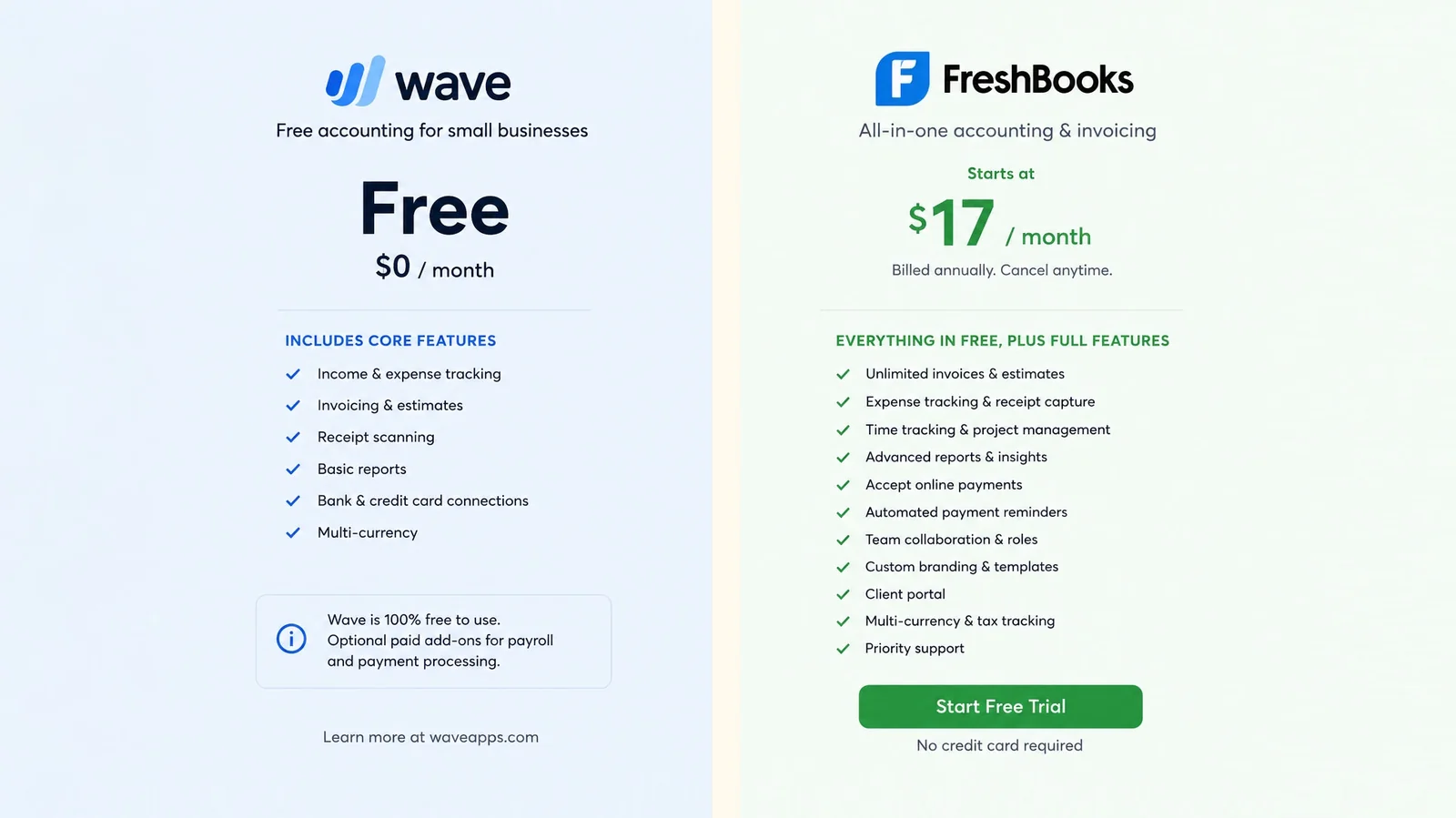
The most common reason someone ends up comparing FreshBooks and Wave is the price difference. Wave is free. FreshBooks is not. For a freelancer or small business owner watching their expenses, that gap is immediately attractive.
But the price comparison is more complicated than the headline suggests — and for a meaningful proportion of small businesses, the platform that appears free ends up being the more expensive option once the full picture is understood.
This is not a hit piece on Wave. It is a genuinely useful platform for specific situations. But the free-versus-paid framing obscures important differences in features, support, and true cost — and making the right choice requires understanding those differences clearly.
This comparison covers both platforms honestly — what each does well, where each falls short, the real cost of each for different business types, and a clear picture of who should choose which.
The Fundamental Difference
Before getting into feature-by-feature analysis, it helps to understand what each platform is and how it makes money — because the business model directly shapes the product.
FreshBooks is a paid subscription software company. Its revenue comes from monthly or annual subscriptions. Its incentive is to build a product good enough that customers pay for it and keep paying for it. The pricing structure is straightforward — you pay a monthly fee and you get the software.
Wave is a freemium software company. Its core accounting, invoicing, and receipt scanning features are free. Its revenue comes from payment processing fees when customers accept card payments through Wave, and from paid add-ons — primarily payroll and Wave Advisors (access to bookkeeping and accounting professionals). The free accounting software is the acquisition channel for the paid financial services.
This model is not dishonest — but it means Wave's free accounting software is subsidized by the transaction fees generated when customers accept payments. The more card payments you process through Wave, the more revenue Wave generates. This shapes which features get prioritized and what limitations exist in the free tier.
Understanding this helps you evaluate both platforms more clearly.
Pricing — The Real Numbers
Wave Pricing
Wave's core software — accounting, invoicing, expense tracking, receipt scanning — is genuinely free. No monthly fee. No time limit. Free.
The cost lives in:
Payment processing fees: 2.9% plus $0.60 per card transaction for Visa, Mastercard, and Discover. 3.4% plus $0.60 for American Express. Bank payment (ACH) processing costs 1% with a minimum fee.
Payroll: Paid add-on, priced per employee per month. Only available in the US and Canada.
Wave Advisors: Access to Wave's bookkeeping and accounting professionals. Paid monthly. Not included in the free plan.
The transaction fee calculation matters enormously:
A freelancer invoicing $3,000 per month and accepting card payments pays approximately $87 per month in Wave transaction fees — $1,044 per year. A small business invoicing $8,000 per month pays approximately $233 per month in transaction fees — $2,796 per year.
Compare this to a flat-rate paid accounting platform — and the supposed cost advantage of Wave's free software disappears, often completely, and sometimes reverses.
The calculation is straightforward: take your average monthly card payment volume, multiply by 0.029, add $0.60 per transaction. If the result exceeds the monthly cost of a paid alternative — and for most businesses processing meaningful card payment volume, it does — Wave is not the cheaper option.
FreshBooks Pricing
FreshBooks has four plans — Lite, Plus, Premium, and Select.
The Lite plan is the lowest-cost entry point — but with a significant constraint. Five billable clients only. For freelancers just starting out, this is fine. For anyone with a growing client base, it forces an upgrade.
The Plus plan removes the client cap and adds team member collaboration — at a meaningfully higher monthly cost. Additional users cost extra on all plans.
FreshBooks frequently offers promotional pricing for new customers — but the regular price is what matters for long-term cost comparison.
The real FreshBooks cost depends on:
- How many billable clients you have (determines whether Lite is sufficient)
- How many users you need (per-user fees apply)
- Whether you need bank reconciliation (available on higher plans)
For a solo freelancer with five or fewer clients, FreshBooks Lite is the lower-cost paid option. For businesses with more clients or teams, the cost increases meaningfully.
Invoicing — FreshBooks Wins
FreshBooks started as an invoicing tool and that heritage is evident. The invoicing experience is clean, fast, and polished — one of the best in the market regardless of price.
FreshBooks invoicing strengths:
- Professional invoice templates that look designed rather than default
- Fast invoice creation — a complete invoice in under two minutes
- Automatic payment reminders — pre-due, due date, and multiple overdue stages
- Online payment acceptance via Stripe and PayPal
- Recurring invoices for regular clients
- Invoice open tracking — know when a client viewed your invoice
- Time tracking integrated directly with invoicing — log hours and bill them in one step
- Excellent mobile invoicing experience
Wave invoicing:
Wave's invoicing is functional and free — and for basic use, it works adequately. Professional templates are available. You can send invoices by email. Clients can pay online through Wave Payments.
But the gaps compared to FreshBooks are noticeable:
- Automatic payment reminders are not available on the free plan. You chase manually.
- Time tracking is not integrated — you cannot log hours against clients and bill them directly.
- The overall invoicing experience is less polished — functional but not refined.
- Invoice open tracking is not available.
The verdict on invoicing: FreshBooks wins clearly. The automatic payment reminder gap alone is significant — for any business with regular outstanding invoices, the manual chasing that Wave requires on the free plan is a meaningful time cost.
Expense Tracking
FreshBooks expense tracking:
- Bank account connection and automatic transaction import
- Expense categorization
- Receipt scanning via mobile app
- Billable expense marking — attach expenses to clients and invoice them automatically
- Expense reports
Wave expense tracking:
- Bank account connection and automatic transaction import
- Expense categorization
- Receipt scanning via mobile app (Wave Receipts)
- Basic expense reports
Both platforms cover the core expense tracking workflow. The difference is in the depth — FreshBooks handles billable expenses more cleanly, and the overall expense management interface is more refined.
The verdict on expense tracking: Broadly comparable for basic use. FreshBooks is stronger for businesses with billable client expenses.
Bank Reconciliation
FreshBooks: Bank reconciliation is available — but only on Plus and higher plans. The Lite plan does not include it. For businesses on the Lite plan, proper bank reconciliation requires upgrading.
Wave: Bank reconciliation is available on the free plan. It is one of the areas where Wave compares favorably to FreshBooks Lite — basic reconciliation is included without paying anything.
The verdict on bank reconciliation: Wave wins at the free tier versus FreshBooks Lite. FreshBooks wins at the Plus tier and above — the implementation is more complete.
Financial Reporting
FreshBooks reporting: FreshBooks generates a solid set of financial reports — Profit & Loss, balance sheet, tax summary, accounts aging. The reports are clean and readable. For most small businesses, the reporting covers the essentials.
The depth is below QuickBooks — chart of accounts customization is limited, some advanced reports are unavailable — but for the majority of small businesses, FreshBooks reporting is adequate.
Wave reporting: Wave's reporting is more limited — basic Profit & Loss, balance sheet, cash flow, and sales tax reports. The reports are functional but less refined than FreshBooks. Custom date ranges and period comparisons are available but the overall reporting capability is basic.
The verdict on financial reporting: FreshBooks wins. More comprehensive, better formatted, more useful for business decision-making.
Payment Processing
This is one of the most important differences in the comparison — and where the true cost picture becomes clear.
FreshBooks payment processing: FreshBooks integrates with Stripe and PayPal. Payment processing fees are charged by Stripe and PayPal directly — FreshBooks does not add its own layer of fees. The rate you pay is the standard Stripe or PayPal rate.
Stripe's standard rate is 2.9% plus $0.30 per successful card transaction. PayPal's standard rate is similar. These rates are charged directly by the payment processors — not by FreshBooks.
Wave payment processing: Wave has its own payment processing system — Wave Payments. The rate is 2.9% plus $0.60 per card transaction (higher than Stripe's $0.30 per transaction fee). For ACH bank payments, Wave charges 1% with a minimum fee.
Every payment processed through Wave Payments generates revenue for Wave — which is how the free software is funded.
The practical difference:
For a business processing $5,000 in card payments per month:
- Via Stripe (FreshBooks): approximately $145 in fees (2.9% + $0.30 × number of transactions)
- Via Wave Payments: approximately $145–175 in fees (2.9% + $0.60 × number of transactions)
The per-transaction fee difference ($0.30 vs $0.60) becomes significant at high transaction volumes — particularly for businesses with many smaller transactions rather than a few large ones.
The verdict on payment processing: FreshBooks — via Stripe integration — gives you access to standard market-rate payment processing. Wave's own payment processing is more expensive on a per-transaction basis, particularly for businesses with higher transaction counts.
Customer Support
This is one of the starkest differences in the comparison.
FreshBooks support: FreshBooks offers phone support, email support, and live chat. Support quality is generally well-regarded — response times are reasonable, support staff are knowledgeable, and the overall support experience is positive relative to the market.
Wave support: Wave's free plan offers community forum support only — no live chat, no phone, no email support from Wave staff. If you have a problem, you search the community forum for similar issues and hope someone has encountered the same situation.
Paid Wave add-ons — Wave Advisors — provide access to human support. But that is not free.
For a business owner who encounters a problem with their accounting software — a bank feed that stops syncing, a reconciliation that will not balance, an invoice that has not delivered — the difference between community forum support and human support is significant.
The verdict on support: FreshBooks wins, and it is not close. Community forum support is not adequate for time-sensitive accounting issues.
Multi-Currency Support
FreshBooks: Multi-currency invoicing is supported — you can invoice clients in their local currency and FreshBooks handles the conversion.
Wave: Multi-currency support is not available. If you invoice clients in different currencies, Wave cannot handle it. Every invoice must be in your home currency.
The verdict on multi-currency: FreshBooks wins. Wave does not support multi-currency at all — which is a dealbreaker for any freelancer or small business with international clients.
Time Tracking
FreshBooks: Native time tracking is one of FreshBooks' standout features. Log hours against clients and projects, view running timers, and convert time logs to invoice line items with one click. For hourly billing, this integration is genuinely valuable.
Wave: No native time tracking. You need a separate tool and manual entry into Wave if you bill by the hour.
The verdict on time tracking: FreshBooks wins clearly.
Mobile Experience
FreshBooks: One of the best mobile apps in the accounting software space. Full invoicing, expense capture, time tracking, and report viewing on iOS and Android. A polished native app experience.
Wave: Wave has native iOS and Android apps — the Wave Invoicing app and the Wave Receipts app. They are functional but more limited than FreshBooks' mobile offering. The experience is more basic.
The verdict on mobile: FreshBooks wins on overall mobile experience quality.
Who Should Choose Wave
Wave is genuinely the right choice for specific situations — and dismissing it entirely because of the fee structure would be wrong.
Wave is right for you if:
- Your business is very early stage and cash is tight — the free software genuinely helps when revenue is minimal
- You primarily receive payment by bank transfer rather than card — the transaction fee concern is minimal if most clients pay by bank transfer
- Your accounting needs are basic — a handful of invoices per month, simple expense tracking, no need for multi-currency or time tracking
- You are testing whether freelancing or a business idea is viable before committing to paid software
- You do not need human support and are comfortable with self-service troubleshooting
Wave becomes the wrong choice when:
- Card payment volume reaches the point where transaction fees exceed the cost of a paid alternative
- You need multi-currency invoicing
- You need automatic payment reminders without paying extra
- You need reliable human support
- Your business starts growing and you hit the feature ceiling
Who Should Choose FreshBooks
FreshBooks is right for you if:
- Invoicing quality is your primary concern and you want the best experience in the market
- You bill clients hourly and need integrated time tracking
- You have fewer than five active clients and the Lite plan covers your needs without upgrade
- You want reliable human support
- Multi-currency invoicing matters to you
- You prioritize ease of use over accounting depth
FreshBooks becomes the wrong choice when:
- You grow beyond five billable clients and the upgrade cost feels disproportionate to the added value
- You need your team on the platform without per-user fees accumulating
- You need comprehensive bank reconciliation on an entry-level plan
- You want full accounting depth at the price FreshBooks charges for Lite
Where Accoru Fits in This Comparison
Both FreshBooks and Wave serve specific needs well — and both have meaningful limitations that affect a substantial portion of small businesses.
Wave's free model works until card payment volume makes it expensive — and the feature ceiling is reached faster than many users expect. FreshBooks' invoicing excellence is real — but the client caps, per-user fees, and limited accounting on lower plans are genuine constraints.
Accoru is built for businesses that want complete accounting functionality — invoicing, expense tracking, bank reconciliation, financial reports, multi-currency, and accountant access — at a flat price with no client limits, no per-user fees, and no feature tiers.
It is not free. But for businesses at the point where Wave's transaction fees match or exceed a monthly subscription, or where FreshBooks' constraints are starting to bite, it addresses the gaps that both platforms leave.
Side-by-Side Summary
| Feature | FreshBooks Lite | Wave Free | Accoru |
|---|---|---|---|
| Monthly Cost | Paid | Free | Flat rate |
| Transaction Fees | Via Stripe/PayPal | 2.9% + $0.60/card | Via Stripe/PayPal |
| Client Limits | 5 clients | None | None |
| Auto Payment Reminders | ✅ | ❌ | ✅ |
| Time Tracking | ✅ | ❌ | ❌ |
| Bank Reconciliation | ❌ | ✅ | ✅ |
| Multi-Currency | ✅ | ❌ | ✅ 150+ |
| Full Financial Reports | ⚠️ Basic | ⚠️ Basic | ✅ |
| Human Support | ✅ | ❌ Community only | ✅ |
| Mobile App | ✅ Native | ✅ Native | Browser |
| Per-User Fees | ✅ | ❌ | ❌ |
The Bottom Line
Wave is genuinely free — for the software. But free software that generates revenue through transaction fees is not free for businesses that accept card payments. Calculate your real monthly cost before assuming Wave is the cheaper option.
FreshBooks is genuinely good at invoicing. The experience is polished, the time tracking integration is valuable, and the support is solid. But the client caps, per-user fees, and limited bank reconciliation on the entry plan mean it is most suitable for small freelance operations that stay within those constraints.
The right choice depends on your situation:
- Processing minimal card payments and need basic invoicing at zero cost → Wave
- Billing hourly with a small client base and want the best invoicing experience → FreshBooks
- Growing beyond five clients, need multi-currency, want complete accounting at flat pricing → Consider alternatives
Frequently Asked Questions
Q: Is Wave really free? A: The accounting software is genuinely free — no monthly fee, no time limit. The cost lives in payment processing fees (2.9% + $0.60 per card transaction) and paid add-ons for payroll and advisor access. For businesses accepting card payments, the transaction fees can exceed the cost of paid alternatives. Calculate your real cost based on your actual card payment volume.
Q: Does Wave have automatic payment reminders? A: Automatic payment reminders are not available on the free Wave plan. You need to chase overdue invoices manually. This is one of the most significant practical limitations of the free tier — for any business with regular outstanding invoices, the time cost of manual chasing is meaningful.
Q: Can I use FreshBooks for free? A: FreshBooks does not offer a permanently free plan. It offers a trial period for new customers. After the trial, a paid subscription is required.
Q: Which is better for a very small freelance business? A: For a freelancer just starting out with minimal transactions, a handful of clients, and primarily bank transfer payments — Wave's free plan is adequate and cost-effective. For a freelancer with growing card payment volume, more than five active clients, or a need for automatic reminders and multi-currency support — a paid alternative delivers better value.
Q: Does FreshBooks support bank reconciliation on the entry plan? A: No. Bank reconciliation on FreshBooks requires the Plus plan or above. The Lite plan does not include it. If bank reconciliation is important to you — and for most businesses it should be — factor the cost of the Plus plan into your comparison rather than the Lite plan price.
Q: Can Wave handle international invoicing? A: Wave does not support multi-currency invoicing. Every invoice must be in your home currency. For freelancers or small businesses with international clients, this is a significant limitation that makes Wave unsuitable regardless of the pricing advantage.
Accoru gives small businesses complete accounting functionality — automatic payment reminders, multi-currency invoicing, bank reconciliation, full financial reports, and human support — at a flat price with no transaction fees on top.