How to Invoice as a Freelancer — From First Client to Getting Paid Fast
Freelance invoicing is not complicated — but most people get it wrong in the same ways. Here is the complete picture, from what goes on the invoice to getting paid without chasing.

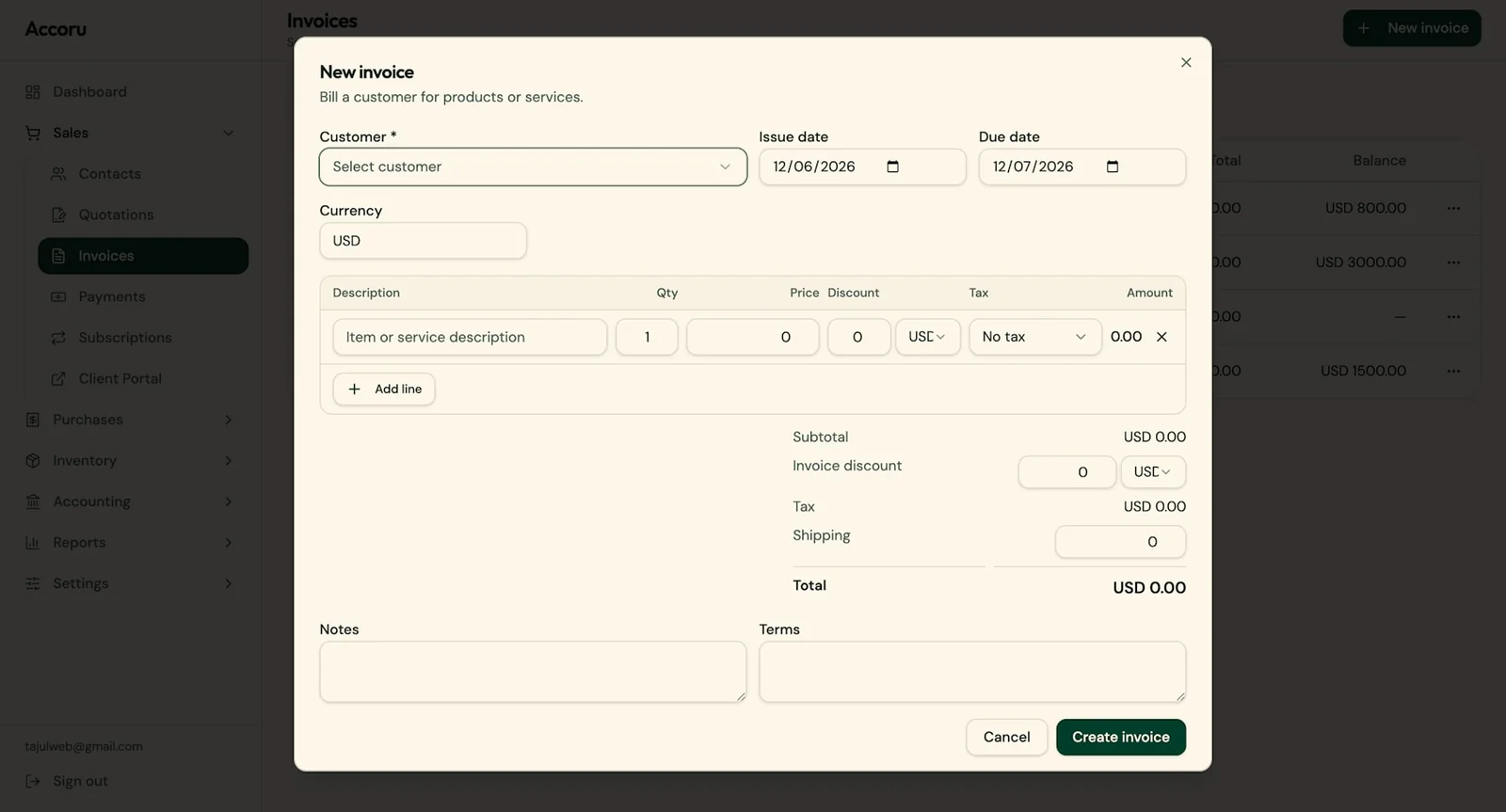
The first time you invoice a client as a freelancer, the process feels more significant than it should. You have done the work. Now you need to ask for the money. And suddenly there are questions you did not anticipate — what goes on the invoice, how do you number it, what payment terms should you use, how do you send it professionally, and what do you do if the client does not pay?
None of these questions are complicated. But they are worth getting right from the start — because good invoicing habits, built early, save significant time and stress as the freelance business grows.
This guide covers the complete freelance invoicing process — from setting up your first invoice to building a system that handles billing automatically while you focus on the work.
Why Freelance Invoicing Is Different
Freelance invoicing has specific characteristics that differ from invoicing in a corporate or agency context — and those differences shape the approach.
You are often the only person handling billing. There is no accounts department, no finance team, no admin support. Every invoice, every reminder, every follow-up is your responsibility. This makes efficiency and automation more important, not less — because time spent on billing is time not spent on paid work.
Your client relationships are often personal. Unlike corporate B2B transactions, freelance client relationships frequently involve personal rapport. This makes chasing unpaid invoices feel more uncomfortable — but also means that a well-handled billing process reinforces the professional impression you have worked to create.
Income is typically irregular. Without a salary, cash flow depends directly on invoices being sent promptly and collected efficiently. A delayed invoice or a slow-paying client has immediate personal financial implications that a corporate employee does not face.
Your invoices may be scrutinized more closely. Particularly by corporate clients, a freelancer's invoice is sometimes held to higher standards of completeness and accuracy than expected — because there is no assumed relationship between the business sending it and the client's procurement process.
Getting invoicing right as a freelancer is both a professional and financial necessity.
Before You Send Your First Invoice
Three things to set up before you send your first invoice — each of which makes every subsequent invoice faster and more professional.
01 — A dedicated business bank account
Separate your business income from personal finances from day one. A dedicated business account — even a basic one — makes expense tracking cleaner, tax preparation simpler, and your finances clearer.
When clients pay your invoices, those payments land in a dedicated account. When you pay business expenses, they come from the same account. The separation removes the ambiguity that causes bookkeeping headaches later.
02 — Invoicing software
Word documents and spreadsheets work for a single invoice. They do not work for a growing freelance practice — they cannot track payment status, send automatic reminders, number invoices sequentially, or connect to payment processing.
Set up invoicing software before your first invoice. Configure your business details, logo, default payment terms, and tax settings once — and every future invoice is faster to create, more consistent in format, and automatically tracked.
Accoru handles the complete invoicing cycle — creation, sending, tracking, payment reminders, and accounting — from one platform. The setup takes fifteen minutes and saves significantly more than that on the first invoice alone.
03 — Your invoicing terms — decided in advance
Before you send your first invoice, decide:
- Payment terms — How long will clients have to pay? Net 14 is a reasonable default for most freelance work. Net 30 is the industry standard for corporate clients.
- Payment methods — Will you accept card payments (via Stripe), PayPal, bank transfer, or all three?
- Late payment policy — Will you charge interest on late payments? State the rate clearly if so.
- Deposit requirement — Will you require upfront payment for new clients or large projects?
Deciding these before you need them means you are not making them under pressure when the first invoice is due.
What Goes on a Freelance Invoice
A professional freelance invoice contains all the standard invoice elements — your details, the client's details, line items, totals, and payment information — plus a few elements that are particularly important in the freelance context.
The essential elements:
- The word "Invoice" — clearly labeled
- Your full name or business name
- Your address and contact details
- Your tax registration number (if applicable — VAT number, ABN, etc.)
- A unique invoice number
- Invoice date
- Due date
- Client name and billing address
- Detailed line items — description, quantity, rate, total
- Subtotal and any applicable tax
- Total amount due
- Payment instructions — bank details and/or payment link
Freelance-specific considerations:
Your trading name vs your legal name: If you freelance under a business name — "Jane Smith Creative" rather than "Jane Smith" — use the trading name on invoices but include your legal name where required by your jurisdiction.
Tax registration: If you are registered for VAT, GST, or equivalent, your registration number must appear on every invoice. If you are below the registration threshold, you do not charge tax and do not need a registration number.
Describing your work: Freelance line item descriptions should be specific enough that the client can match the invoice to the work delivered — "Website copywriting — About page, Services page, and Home page, March engagement" rather than "Copywriting."
For project-based work, include the project name or reference. For hourly work, include the date range, the number of hours, and the hourly rate. For retainer work, include the month or period being billed.
How to Number Freelance Invoices
Invoice numbering is one of the simplest elements — and one of the most commonly done inconsistently by new freelancers.
The principles:
Every invoice needs a unique number. No two invoices should ever have the same number. The sequence must be auditable — tax authorities expect to see a logical, consistent invoice numbering history.
Sequential numbering is the standard. Start at 001 (or 0001, or 1) and increment by one for each invoice. Do not restart the sequence mid-year.
Choose a format and stick with it. Common formats:
- Simple sequential: 001, 002, 003
- Year-prefixed: 2024-001, 2024-002
- Client-prefixed: ABC-001, ABC-002 (for client-specific reference)
- Year-month: 202403-001 (useful for high-volume billing)
Good invoicing software handles this automatically. Accoru assigns invoice numbers sequentially — you never have to think about it.
Choosing the Right Payment Terms as a Freelancer
Payment terms are one of the most impactful decisions a freelancer makes — they directly determine how long after completing work the cash arrives.
The default problem: Most freelancers default to Net 30 because it is familiar. But Net 30 means waiting up to a month after the invoice is sent — and potentially longer if the client pays a few days late. For a freelancer covering monthly expenses, this cash cycle can be tight.
The Net 14 argument: Most individual and small business clients can pay within two weeks without difficulty. Moving from Net 30 to Net 14 as a default halves the theoretical cash collection time without creating meaningful friction for most clients.
Matching terms to client type:
- Individual clients and small businesses: Net 7 to Net 14
- Small and medium companies: Net 14 to Net 30
- Large corporations with formal payment processes: Net 30 (they may not be able to pay faster regardless of terms)
Deposits for new clients and large projects:
A deposit — typically 25–50% of the total project value — paid before work begins protects against non-payment and demonstrates client commitment. For a new client with no payment history, a deposit is prudent regardless of how confident you feel about the relationship.
State deposit requirements clearly in your project agreement before work begins — not as a surprise on the first invoice.
The Invoicing Workflow — From Completing Work to Getting Paid
Here is the complete freelance invoicing workflow with each stage made as efficient as possible.
Stage 01 — Complete the work
Invoice on the day you complete the work — not the next day, not at the end of the week, not when you get around to it. Every day between completing work and sending the invoice is a day the payment clock has not started.
Stage 02 — Create the invoice
In Accoru:
- Open a new invoice
- Select the client (details populate automatically)
- Add line items — description, quantity, rate
- Confirm the due date
- Preview
- Send
Total time: two to three minutes for a typical invoice. Less for a recurring client where line items are saved.
Stage 03 — Confirm receipt
With Accoru's invoice tracking, you see when the client opens your invoice email — giving you confirmation that it was received and reviewed. No need to send a separate "just checking you received this" email.
Stage 04 — Automatic reminders handle the follow-up
Configure your payment reminder schedule once. Every invoice — including this one — follows that schedule automatically:
- Pre-due reminder (3 days before): friendly nudge
- Due date reminder: clear payment prompt with Pay Now button
- Overdue reminders (7, 14, 30 days): escalating follow-up
You do not write any of these. They send automatically and stop when payment arrives.
Stage 05 — Payment received
When the client pays — via Stripe, PayPal, or bank transfer — you receive a notification. The invoice is marked as paid. The income is recorded in your accounting records automatically. The payment reminder cycle stops.
Setting Up Recurring Billing for Retainer Clients
For clients on a regular retainer — billed the same amount on the same schedule — recurring invoices eliminate the entire manual billing process.
Set up once in Accoru:
- Client details
- Line items and amount
- Monthly schedule (or weekly, quarterly — whatever applies)
- Start date
From that point, invoices generate and send automatically on the scheduled date every month. Payment reminders run automatically on each invoice. You receive notifications when each is sent and when each is paid.
For a freelancer with five monthly retainer clients, this eliminates 60 manual invoicing tasks per year. The five setup sessions take ten minutes in total. Every invoice after that takes zero minutes.
Invoicing International Clients
Freelancers increasingly work with international clients — and international invoicing has specific requirements.
Invoice currency: State the currency explicitly on every invoice — "Total: USD 2,500" rather than just "$2,500." When both you and your client could interpret "$" differently, explicit currency removes ambiguity.
Multi-currency invoicing: If you invoice clients in different currencies — USD for US clients, GBP for UK clients, EUR for European clients — you need invoicing software that supports multi-currency. Accoru includes multi-currency support across 150+ currencies on every plan.
International payment acceptance: Stripe processes card payments from clients in most countries. PayPal is widely used internationally. Both work across currencies with automatic conversion.
International bank transfer details: For clients paying by bank transfer, include your IBAN and BIC/SWIFT code in addition to domestic account details — international transfers require these.
Tax on international services: The VAT or GST treatment of services delivered across borders depends on the jurisdictions involved and the nature of the service. For B2B services between VAT-registered businesses in different countries, reverse charge often applies — the buyer accounts for VAT rather than the seller. Confirm the correct treatment for your specific client relationships with a tax professional.
How to Handle Late-Paying Clients Without Damaging the Relationship
Late payment is one of the most common freelance frustrations — and one that is most effectively managed by systems rather than by individual judgment in the moment.
The automation-first approach: Automatic payment reminders handle the vast majority of late payments without any personal involvement. Most late payments are due to oversight — the invoice was forgotten, deprioritized, or lost in an inbox. A timely, professional reminder resolves most of these situations without any awkwardness.
When automation is not enough: For invoices that remain unpaid after the full automated reminder cycle, a personal follow-up is appropriate — a brief, professional email or phone call acknowledging the outstanding invoice and asking when to expect payment.
For detailed guidance on the complete follow-up process, including email templates for each stage, see our guide on how to follow up on unpaid invoices.
The relationship reality: Professional, consistent payment follow-up does not damage relationships — it reinforces that you run a well-managed business. What damages relationships is inconsistent, emotionally charged follow-up that creates pressure and awkwardness. Systematic, professional follow-up is the opposite of this.
Tracking Your Income for Tax
Every invoice you send is an income record. Keeping accurate income records is both a legal requirement and a practical necessity for managing your tax obligations.
Good invoicing software tracks income automatically — every invoice, every payment, every outstanding amount is recorded. At any point, you can see exactly what you have earned, what is outstanding, and what your income has been over any period.
For tax purposes, this means:
- You can produce an accurate income total for any tax period without reconstructing it from bank statements
- You can verify that every payment received has a corresponding invoice
- You can identify any income recorded in your accounting system that has not yet been received
Freelancers in most jurisdictions need to make quarterly or annual income tax payments based on their earnings. Tracking income through invoicing software rather than trying to reconstruct it from memory and bank statements at the end of the year is one of the simplest and most valuable bookkeeping habits to build.
Common Freelance Invoicing Mistakes
Sending invoices late. Every freelancer does this at least once — finishing a project, getting busy with the next one, and sending the invoice a week or two later than they should. The fix is a personal rule: invoice on the same day you complete the work. Without exception.
Vague line item descriptions. "Design work — $2,000" tells the client nothing useful. "Brand identity design — logo, colour palette, and typography system, March engagement" is specific, professional, and matches the brief the client approved.
Using Word or Google Docs. Both work for a single invoice. Neither scales. The time cost of manual invoicing — creating, numbering, tracking, chasing — compounds as the client list grows. Switch to proper invoicing software early.
Not setting up automatic reminders. The single highest-impact change most freelancers can make to their invoicing process. Reminders sent automatically on a consistent schedule recover late invoices without manual effort and without discomfort.
Using Net 30 by default when Net 14 would work. Review your payment terms. If your clients — individual people and small businesses — can pay within two weeks, there is no reason to give them a month. Shorter terms improve cash flow without creating friction for most freelance clients.
Not requiring deposits for new clients or large projects. A non-paying client who has paid a 50% deposit is a very different situation from a non-paying client who has not paid anything. Deposits protect your time and financial exposure. Most professional clients expect them.
Invoicing to the wrong contact. For corporate clients, confirm who the invoice should be addressed to — the accounts payable contact, the project manager, the finance team. Sending to your day-to-day contact who does not handle payments means the invoice needs to be forwarded, which adds delay.
Building a Freelance Invoicing System That Runs Itself
The goal of a freelance invoicing system is to reduce the ongoing time and mental load of billing to as close to zero as possible — while keeping income flowing reliably.
The components:
Invoicing software — Accoru or equivalent. Handles creation, sending, tracking, and reminders.
Stripe and PayPal connected — Pay Now button on every invoice. Clients pay in one click.
Automatic reminders configured — Pre-due, due date, and overdue. Set once, runs forever.
Recurring invoices for retainer clients — Configured once, generates and sends automatically.
Default payment terms per client — Shorter for individuals, standard for corporates. Stored in the client database.
Invoice on completion, every time — A personal discipline that the system reinforces.
With this setup:
- Retainer clients are billed automatically every month
- One-off project invoices take three minutes to create and send
- Payment reminders run without any manual effort
- Income is tracked automatically
- Tax preparation uses real data rather than reconstructed estimates
The system handles the administration. You handle the work.
Summary
Freelance invoicing is not complicated — but it does require the right habits and the right tools from the start.
The key principles:
- Invoice on the day you complete the work — every time
- Use invoicing software — not Word or spreadsheets
- Include all required elements — your details, client details, specific line items, explicit due date, complete payment instructions
- Use payment terms that serve your cash flow — Net 14 for most clients
- Connect Stripe and PayPal — put a Pay Now button on every invoice
- Set up automatic payment reminders — before you send your first invoice
- Use recurring invoices for retainer clients — eliminate manual billing entirely
- Require deposits for new clients and large projects
Built correctly from the start, a freelance invoicing system is largely self-managing — leaving you free to focus on the work rather than the administration.
Frequently Asked Questions
Q: Do I need to register a business to invoice clients as a freelancer? A: In most jurisdictions, you can invoice clients as a sole trader or self-employed individual without formally registering a business entity. You invoice under your own name or a trading name. You may need to register for self-employment tax and, if your income exceeds the threshold, for VAT or GST. Check the specific requirements in your jurisdiction — requirements vary significantly between countries.
Q: What invoice number should I start with? A: Any number — 001, 1, 0001, or a year-prefixed format like 2024-001. The important thing is that you start a consistent sequence and maintain it. There is no requirement to start at any specific number. Using a year prefix — 2024-001 — makes it easy to see at a glance which year an invoice was issued without checking the date.
Q: Should I send invoices by email or through invoicing software? A: Through invoicing software. Sending directly from your invoicing platform — rather than attaching a PDF to a manual email — gives you invoice tracking (you can see when the invoice was opened), automatic payment reminders, payment link integration, and automatic recording in your accounting system. All of these are unavailable when you send a PDF from your personal email.
Q: How do I handle a client who always pays late? A: First, ensure automatic payment reminders are configured — most late payments are due to oversight rather than intent, and reminders resolve the majority. For a client who pays late despite reminders, consider shortening their payment terms on future invoices, requiring a deposit on future projects, or having a direct conversation about payment timing. Persistent late payment from a client with no legitimate reason is a business decision — whether the relationship is worth continuing on those terms.
Q: Can I invoice in a foreign currency if I am based in the UK or Australia? A: Yes — you can invoice in any currency regardless of where you are based. Use invoicing software that supports multi-currency to handle exchange rate conversion and home currency reporting automatically. Confirm the correct tax treatment for cross-border services with a tax professional, as VAT and GST rules for international services vary.
Q: How do I invoice a client who has not paid their previous invoice? A: Send the new invoice as normal while also following up on the outstanding previous one. Do not withhold the new invoice as leverage — it creates confusion and may damage the relationship. Follow up on the outstanding invoice separately, using the escalation path outlined in your payment reminder schedule.
Accoru gives freelancers the complete invoicing system — professional invoices, automatic payment reminders, Stripe and PayPal integration, recurring billing for retainer clients, and multi-currency support — in one platform.