QuickBooks Pricing — What You Actually Pay vs What You Actually Get
QuickBooks starts at $30/month but most small businesses pay significantly more. Before you renew — or sign up — here is the full cost breakdown nobody shows you upfront.

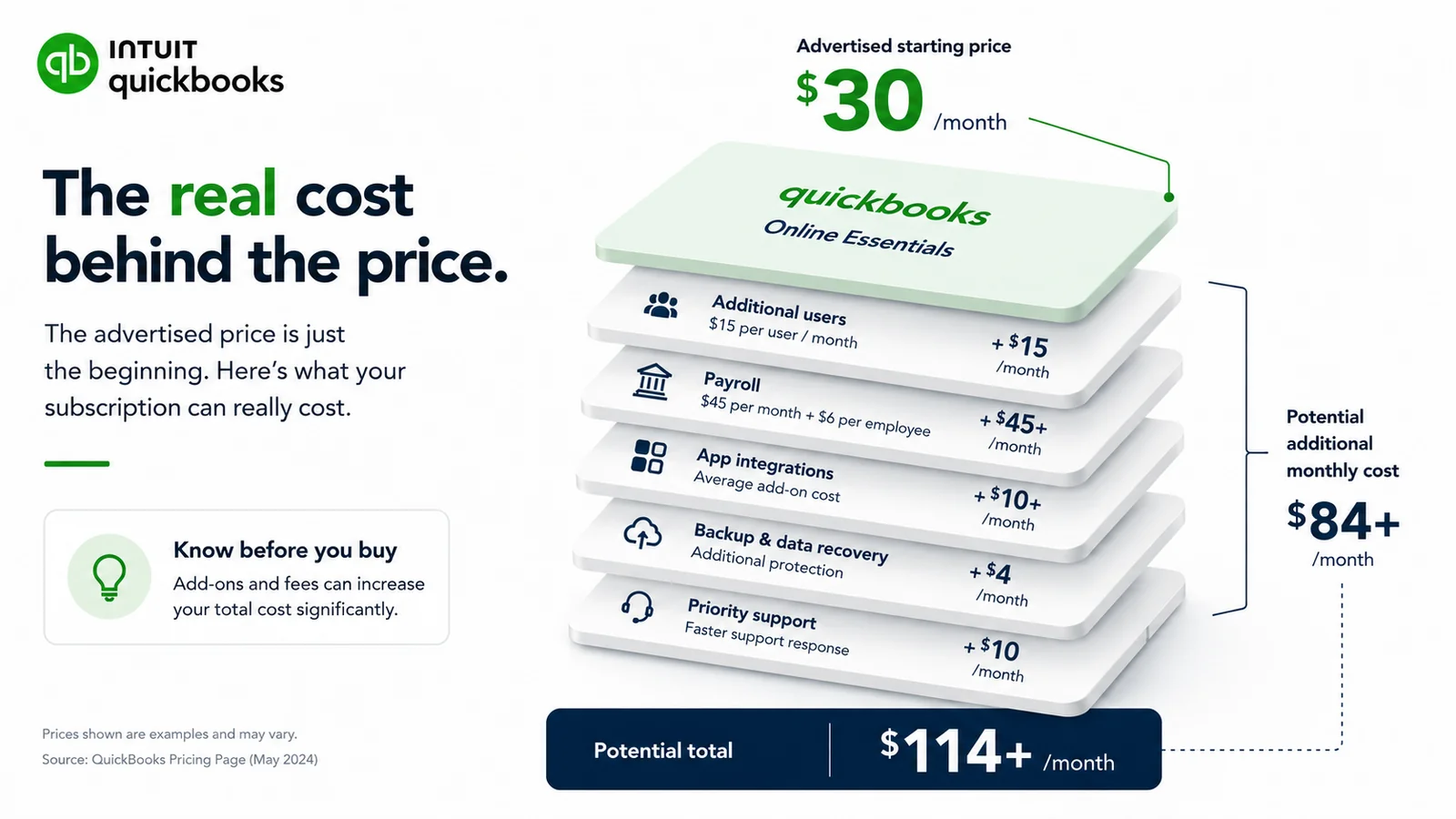
QuickBooks advertises its Simple Start plan at a headline price. But most small businesses do not end up on Simple Start — and the price most small businesses actually pay is significantly higher than the headline figure suggests.
This is not a critique of QuickBooks as a product. It is a comprehensive, honest look at how QuickBooks pricing works in practice — what the different plans actually include, what forces most small businesses onto higher-cost plans, what add-ons cost, and what you are actually getting for the money.
If you are currently paying for QuickBooks — or considering signing up — this breakdown tells you whether you are on the right plan, whether you are paying for features you do not use, and whether the cost is proportionate to the value you are getting.
How QuickBooks Pricing Is Structured
QuickBooks Online has four plans — Simple Start, Essentials, Plus, and Advanced. Each plan builds on the previous one — adding features and increasing cost.
The plans are designed so that many features small businesses genuinely need are locked behind higher tiers — which means the effective price for a fully functional QuickBooks experience is often significantly higher than the entry-level price suggests.
Here is what each plan actually includes — and more importantly, what it does not.
Simple Start
Simple Start is the entry plan — and the price that gets advertised most prominently.
What it includes:
- One user only
- Income and expense tracking
- Invoicing (unlimited)
- Basic financial reports (P&L, balance sheet)
- Receipt capture
- Bank feed and reconciliation
- Tax preparation reports
- Mileage tracking
What it does not include:
- More than one user — if anyone else needs access, you must upgrade
- Bill management — you cannot enter or track bills from suppliers
- Time tracking
- Inventory tracking
- Budget creation
- Class and location tracking
The one-user limitation is the most significant constraint. Any business where more than one person needs access to the accounting platform — a business partner, a bookkeeper, an employee who records expenses — cannot use Simple Start. The moment a second user is needed, an upgrade is mandatory.
This means Simple Start is genuinely only suitable for a solo business owner with no collaborators on the accounting side.
Essentials
Essentials is the plan most small businesses with any team element end up on. It adds three users, bill management, and time tracking.
What it adds over Simple Start:
- Up to three users (each additional user beyond the plan's limit costs extra)
- Bill management — enter and track bills from suppliers
- Time tracking
What it still does not include:
- Inventory tracking
- Project profitability tracking
- Budget creation
- Class and location tracking
The jump from Simple Start to Essentials represents a significant price increase for features — particularly bill management and additional users — that many businesses consider basic requirements.
Plus
Plus is where QuickBooks starts to feel like a complete accounting platform for a growing business. It adds inventory, project tracking, and budgeting.
What it adds over Essentials:
- Up to five users
- Inventory tracking — track stock levels, set reorder points, manage cost of goods sold
- Project profitability tracking
- Budget creation and budget vs actual reporting
- Class and location tracking
For businesses that need inventory management or project-level profitability tracking, Plus is the minimum viable plan. For the majority of service businesses that do not need inventory, Plus features may not justify the additional cost over Essentials.
Advanced
Advanced is QuickBooks' enterprise-facing plan — designed for larger businesses with more complex requirements.
What it adds over Plus:
- Up to 25 users
- Custom user permissions (more granular than lower plans)
- Automated workflows
- Advanced reporting with customization
- Dedicated account manager
- Priority customer support
- Data restoration services
For most small businesses, Advanced is significantly more than they need — and priced accordingly.
The Add-On Cost Layer
Beyond the base plan costs, QuickBooks has a range of add-ons that increase the total monthly cost.
QuickBooks Payroll
Payroll is not included in any QuickBooks Online plan — it is a separate paid add-on.
QuickBooks offers three payroll tiers — Core, Premium, and Elite — each priced per month plus a per-employee monthly fee.
For a small business with five employees:
- Core payroll: base fee plus per-employee charges
- Premium payroll: higher base fee plus per-employee charges
- Elite payroll: highest base fee plus per-employee charges
The combined cost of QuickBooks Online Plus and QuickBooks Payroll Premium for a five-person team is substantially higher than the base plan price — often two to three times the advertised plan price.
QuickBooks Time (formerly TSheets)
Time tracking on QuickBooks Online — beyond the basic time tracking available on Essentials and above — requires QuickBooks Time, a separate subscription. The premium version, which integrates with payroll and includes GPS tracking, costs extra per user per month.
For businesses that need detailed time tracking integrated with payroll, QuickBooks Time is the solution — but it adds to the total cost.
QuickBooks Live Bookkeeping
For business owners who want a QuickBooks-connected bookkeeper to manage their books, QuickBooks offers Live Bookkeeping — a subscription service where a certified QuickBooks ProAdvisor manages your account.
This is priced monthly based on your average monthly expenses. For the level of service comparable to a part-time bookkeeper, the monthly cost is significant — adding substantially to the base plan cost.
Third-Party App Integrations
Many of the integrations that make QuickBooks genuinely powerful — industry-specific tools, advanced CRM connections, specialized reporting platforms — are third-party paid apps from the QuickBooks App Store. These are not included in the QuickBooks subscription.
For a business using QuickBooks plus two or three paid integrations, the total monthly platform cost can be considerably higher than the base QuickBooks subscription alone.
The Promotional Pricing Problem
QuickBooks consistently offers significant introductory discounts to new customers — typically 50% off for the first three or six months.
These discounts are effective marketing. But they create a pricing trap that catches many small business owners:
- Business owner signs up at the discounted rate
- The discounted period feels affordable
- The discount expires — often without prominent notification
- The full price takes effect
- The business owner either does not notice the price increase immediately, or notices and feels locked in because switching feels like significant effort
The lesson is to evaluate QuickBooks at its full regular price — not the promotional price. The promotional period ends. The regular price is what you will pay for years.
What Small Businesses Actually Pay — Real Scenarios
Rather than discussing abstract plan prices, here are realistic total cost scenarios for common small business situations.
Scenario 01 — Solo Freelancer
Profile: One user, no employees, no inventory, primarily needs invoicing and expense tracking.
Minimum viable plan: Simple Start Real cost: Full Simple Start price What they get: Invoicing, expense tracking, basic reporting, bank reconciliation — one user only
Assessment: Simple Start works for a truly solo operation. The moment a second user is needed, costs increase significantly. For the feature set, many solo freelancers find Simple Start adequate but expensive relative to alternatives.
Scenario 02 — Small Service Business, Two Users
Profile: Business owner plus one employee or bookkeeper needing access. No inventory. Regular supplier bills.
Minimum viable plan: Essentials (Simple Start only supports one user; bill management requires Essentials) Real cost: Full Essentials price What they get: Three users, bill management, basic time tracking, invoicing, expense tracking
Assessment: The jump from Simple Start to Essentials for the second user and bill management is the most common cost inflection point. Many businesses end up paying for three users when they need two — because the plan includes three and there is no option for exactly two.
Scenario 03 — Small Service Business, Three Users, Payroll for Four Employees
Profile: Three users needing platform access. Four employees on payroll. No inventory.
Minimum viable plan: Essentials plus QuickBooks Payroll Core Real cost: Essentials price plus payroll base fee plus four per-employee fees What they get: Full accounting plus payroll
Assessment: This is where QuickBooks costs become genuinely significant. The combination of base plan plus payroll for a small team represents a substantial monthly commitment — often $100–150+ per month depending on payroll tier chosen.
Scenario 04 — Small Product Business With Inventory
Profile: One or two users. Stock tracking needed. No payroll.
Minimum viable plan: Plus (inventory requires Plus or above) Real cost: Full Plus price What they get: Five users, inventory, project tracking, budget vs actual, class tracking
Assessment: A small product business that needs only basic inventory tracking pays for the full Plus plan — including several features (class tracking, project profitability, budget vs actual) they may never use. The price is justified if all Plus features are used. If only inventory tracking is needed, it represents paying for more than required.
Is QuickBooks Worth the Cost?
This is the question the pricing analysis is building toward — and the honest answer is: it depends on what you actually use.
QuickBooks is worth the cost if:
- You have a dedicated bookkeeper or accountant who works in QuickBooks daily — they get full value from its depth
- You need inventory management and project tracking — features locked behind Plus that genuinely serve your needs
- You need payroll and want it integrated with your accounting
- You have complex reporting requirements — department tracking, class tracking, budget vs actual — that QuickBooks handles well
- Your accountant specifically requires QuickBooks and the relationship depends on platform alignment
QuickBooks is not worth the cost if:
- You are a solo operator who only uses Simple Start features — basic invoicing, expense tracking, and reports — and is paying Simple Start price for capabilities available elsewhere at lower cost
- You upgraded to Essentials primarily to add a second user and are not using bill management or time tracking
- You are on Plus primarily for inventory but have a simple product business where basic inventory tracking is all you need
- You are paying for payroll and Live Bookkeeping add-ons on top of an already expensive base plan
- You find the interface overwhelming and avoid it — using only 20% of its capability because the rest is too complex
The businesses that get the most value from QuickBooks are those that use it deeply — the full feature set, daily, with accountants and bookkeepers who know the platform well. The businesses that get the least value are those that are using QuickBooks for basic invoicing and expense tracking and paying for depth they never access.
The Feature-to-Price Question
One of the most useful questions to ask about any software subscription is: what am I actually using, and what am I paying for?
For QuickBooks, this means reviewing your plan and being honest about which features you use regularly.
On Simple Start:
- Do you use only one user? Or do you share login credentials with someone — which violates terms and creates security risk?
- Do you use all the features, or primarily just invoicing and expense tracking?
On Essentials:
- Do you use bill management, or did you upgrade primarily for additional users?
- Do you use time tracking?
On Plus:
- Do you use inventory management?
- Do you use project profitability tracking?
- Do you use class and location tracking?
- Do you use budget vs actual reporting?
If you are on Essentials primarily for three users and not using bill management or time tracking — you are paying Essentials price for Simple Start functionality.
If you are on Plus for inventory tracking and not using project profitability, class tracking, or budget features — you are paying Plus price for Essentials functionality plus inventory.
What QuickBooks Competitors Offer at Lower Price Points
Understanding the QuickBooks pricing context requires knowing what alternatives deliver at lower price points.
Several accounting platforms offer feature sets comparable to QuickBooks Essentials or Plus — including bank reconciliation, multi-currency, unlimited clients, team access, financial reports, and online payment acceptance — at flat rates with no per-user fees and no feature tiers.
The key difference is the pricing model. QuickBooks charges more as you add users and need more features. Flat-rate alternatives charge one price for everything from day one.
For the specific features most small service businesses actually use — invoicing, expense tracking, bank reconciliation, basic financial reports — the gap between QuickBooks' pricing and capable alternatives is significant.
The businesses that are most overpaying for QuickBooks are those that are using it for basic accounting tasks that do not require QuickBooks' depth — and are paying a premium for complexity they neither need nor use.
The Switching Decision
If you read this breakdown and concluded that you are on the wrong QuickBooks plan — or that QuickBooks itself may not be the right platform — the next question is what to do about it.
The switching cost from QuickBooks is real but manageable. QuickBooks allows you to export your data — chart of accounts, transaction history, customer lists — in standard formats. Most accounting platforms accept QuickBooks data imports. The migration process for a small business typically takes a few hours.
The most practical time to switch is at the start of a new financial year — when historical data from the previous year is complete and the new platform starts with a clean opening balance. Switching mid-year creates the complication of needing historical data in both systems.
If switching feels like too much effort right now, at minimum review your current plan:
- Are you on the right plan for your actual usage?
- Are you using the add-ons you are paying for?
- When did your promotional pricing end and what are you actually paying now?
The answer to these questions determines whether the cost is proportionate to the value.
Summary
QuickBooks is a capable and comprehensive accounting platform — genuinely valuable for the businesses that use its depth. But the pricing structure is designed to push businesses toward higher-cost plans through feature gating — and many small businesses end up paying for complexity they do not use.
The honest assessment:
QuickBooks is proportionate value for:
- Businesses that use its depth — inventory, project tracking, class tracking, budget vs actual
- Businesses with accountants who work in QuickBooks daily
- Businesses that need payroll integrated with accounting
- Businesses with complex reporting requirements
QuickBooks is disproportionate value for:
- Solo operators using it primarily for invoicing and expense tracking
- Businesses that upgraded primarily to add a second user
- Businesses using 20% of the feature set and paying for 100% of the price
- Businesses that find it too complex and avoid using it fully
Know what you are paying. Know what you are using. If the two do not align — the cost of staying on the wrong platform is a monthly subscription renewal that could fund something better matched to your actual needs.
Frequently Asked Questions
Q: How much does QuickBooks actually cost per month? A: QuickBooks Online pricing varies by plan — Simple Start, Essentials, Plus, and Advanced — at different price points. The advertised price is often a promotional rate for new customers. The regular full price applies after the promotional period ends. Add-ons — payroll, time tracking, live bookkeeping — increase the total cost significantly beyond the base plan price. Check QuickBooks' current pricing directly for the most accurate figures as prices change periodically.
Q: Why is QuickBooks so expensive compared to alternatives? A: QuickBooks charges a premium for its depth — comprehensive feature set, large integration ecosystem, broad accountant familiarity, and mature platform. The pricing reflects the complexity and breadth of the product. Alternatives that offer comparable core functionality — invoicing, expense tracking, bank reconciliation, financial reports — typically cost less because they are less complex and have lower development and support overhead.
Q: Can I downgrade my QuickBooks plan? A: Yes — you can downgrade to a lower QuickBooks plan. The practical constraint is whether the lower plan includes the features you actually need. If you are on Essentials for bill management and have active bills, downgrading to Simple Start means losing bill management. Review which features you actually use before downgrading to confirm the lower plan is viable.
Q: Is QuickBooks Simple Start enough for a small business? A: For a truly solo business owner with no collaborators and no need for bill management, Simple Start covers basic accounting needs. The one-user limitation is the most significant constraint — any business where a second person needs access must upgrade to Essentials. For the feature set, Simple Start is often considered expensive relative to alternatives that offer comparable functionality at lower prices.
Q: What is the cheapest way to use QuickBooks? A: The cheapest legitimate approach is Simple Start at the regular rate — not the promotional rate, which will expire. Avoid upgrading to higher plans unless you genuinely need the specific features they add. Do not pay for add-ons — payroll, time tracking, live bookkeeping — unless you actively use them. Review your plan annually to confirm it matches your actual usage.
Q: Are there cheaper alternatives to QuickBooks with the same features? A: Several accounting platforms offer feature sets comparable to QuickBooks Essentials or Plus — including bank reconciliation, financial reports, unlimited clients, team access, and online payment acceptance — at lower price points with flat pricing and no per-user fees. The trade-off is typically narrower integration ecosystems and less accountant familiarity compared to QuickBooks.
If you are paying for QuickBooks features you do not use, Accoru offers complete accounting — invoicing, expense tracking, bank reconciliation, and financial reports — at a flat price with every feature included and no per-user fees.